How a GCC Bank Deployed Secure Document Verification in One Week — Without Touching Core Banking
- Qryptal Team
- Mar 19, 2026
- 5 min read
Zero-integration document verification for banking
When a GCC-based bank needed to make its issued documents verifiable — as required by the regulator — the IT team faced a familiar problem.
The obvious approach was API integration: connect the core banking system to a document security solution, generate secure QR codes at the point of document creation, and stamp them onto PDFs automatically.
The problem? API integration depends on the core banking vendor’s roadmap and priorities. Getting a new API endpoint approved, developed, tested, and deployed could take months. The bank’s compliance deadline wouldn’t wait.
This is a pattern we see repeatedly across banks in the region.
The integration challenge
Most banks generate documents — account statements, IBAN letters, salary certificates, loan sanction letters — from their core banking or document management systems. These systems are often managed by third-party vendors, and any changes to the document generation workflow require coordination with them.
To add secure QR codes via API integration, the process typically involves:
- Modifying the document generation workflow
- Adding API calls to the QR generation service
- Testing across all document types
- Deploying to production
Each step depends on the vendor’s availability, priorities, and release schedule — and document security is rarely at the top of that list.
A different approach: folder-based workflow
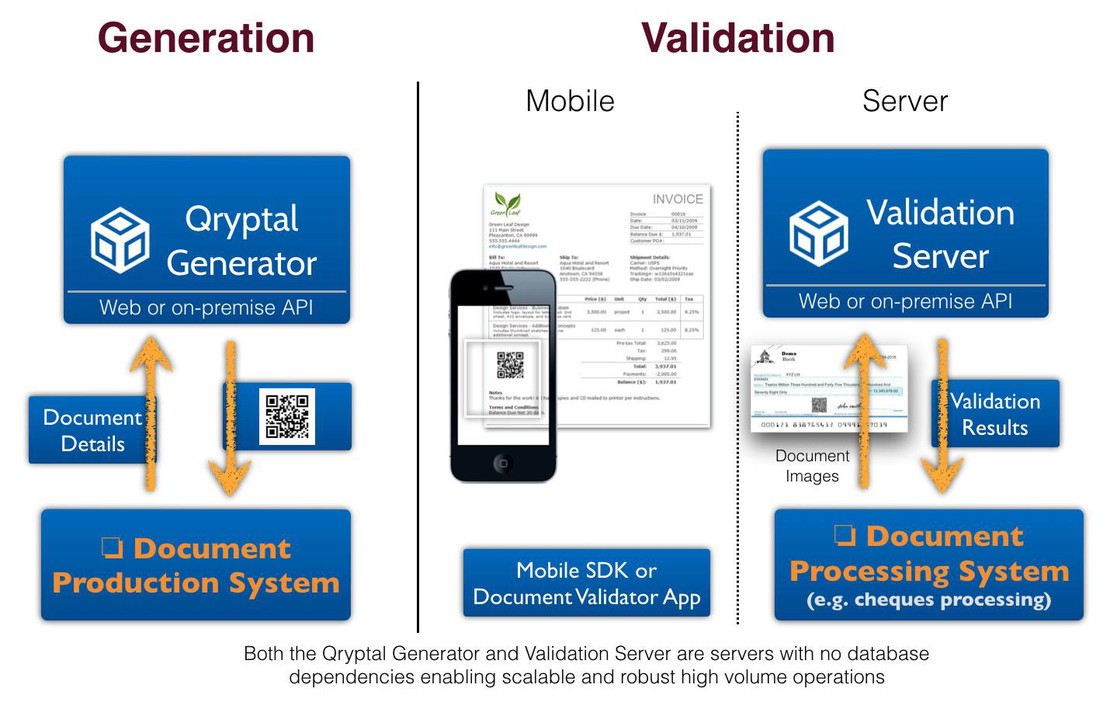
Instead of waiting for API integration, this bank deployed Qryptal’s Secure QR Code System using a simple file-based workflow:
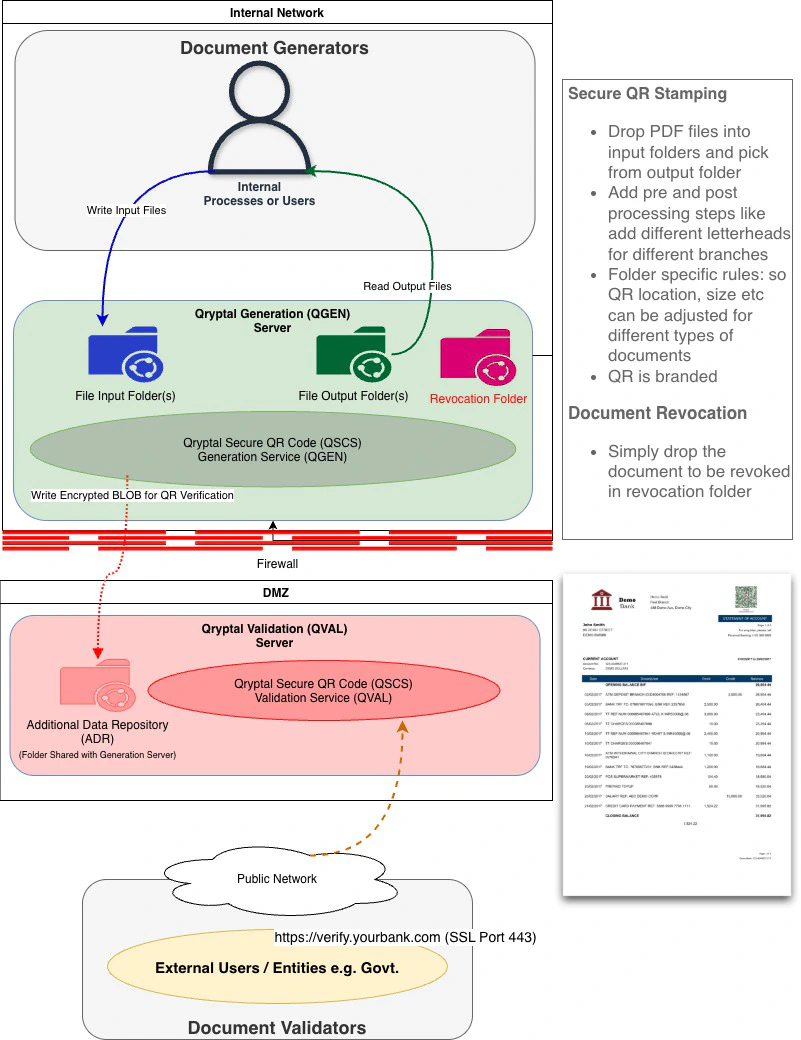
Generation:
- PDF documents are dropped into a shared network folder (the in-folder)
- Qryptal’s on-premise Generator Server (QGEN) automatically picks up the files, stamps each with a cryptographically signed secure QR code, and places the secured PDFs in an out-folder
- The existing document generation process only needs one change: write PDFs to a different folder path
Seamless for existing print workflows:
- Some of this bank’s applications were already sending documents to network printers. By redirecting print output to a virtual printer that writes PDFs to the in-folder, users continue to “print” exactly as before — but instead of a hard copy, they get a QR-stamped, verifiable PDF ready for digital sharing
- Since the physical printer previously supplied pre-printed letterhead stationery, the system now applies branch-specific letterheads (header and footer) digitally — no need to modify the source application or stock pre-printed paper
Pre and post-processing:
- Each folder can have its own configuration: QR code size, position, and design are set per document type
- The QR code itself is branded with the bank’s logo and colours — not a generic black-and-white square
Verification:
- Anyone with the document — a government agency, an employer, an embassy — scans the QR code
- The bank’s own verification page (hosted on their infrastructure) cryptographically validates the code and displays the original document
- No database access. No login required. Instant verification.
Revocation:
- If a document needs to be invalidated, it is placed in a designated revocation folder
- Subsequent verification attempts reflect the revoked status immediately
The minimum viable setup is two Linux servers on the bank’s own infrastructure, which can be scaled with additional servers for high availability as needed. No cloud dependency. No data leaves the bank’s network.
What made this work
No core banking changes. The bank’s existing systems continue generating PDFs exactly as before — they just output to a watched folder instead of (or in addition to) the original destination.
No vendor dependency. There is no API to integrate, no code to modify, no release cycle to coordinate.
Deployment in one week. Once the bank provisioned the production servers and shared folders, the complete deployment — including server installation, QR branding customisation, verification page configuration, letterhead setup for different branches, and testing — took approximately one week.
Expandable without re-architecture. The bank started with a few document types at about a thousand documents per month. Adding new document types is a configuration change: create a new folder pair, set the QR parameters, and documents start flowing. No additional development needed.
The security model
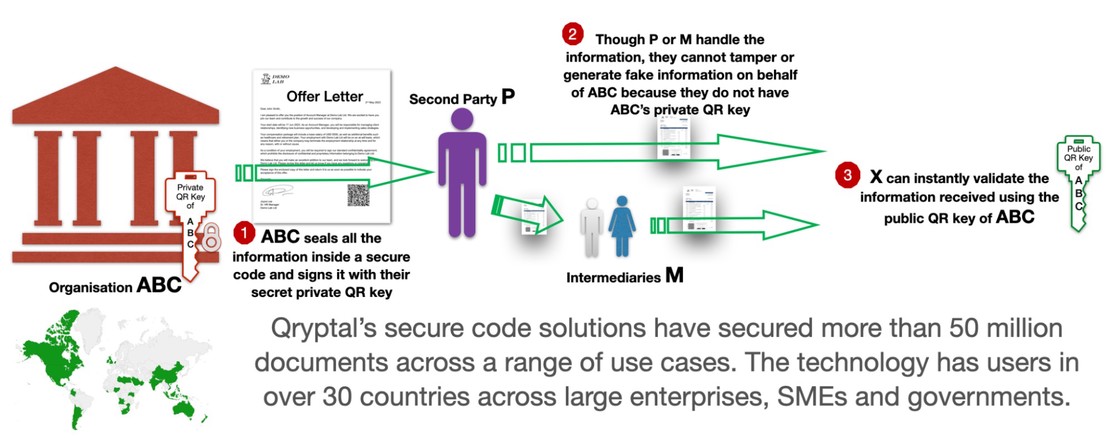
Every document stamped through this workflow is cryptographically signed:
- A SHA-256 hash of the document payload is computed
- A digital signature is generated using the organisation’s private key
- Attachments are encrypted with AES-256, each with a unique key embedded in the QR code
- Documents are stored as encrypted blobs — readable only through the QR code itself
The bank retains full control of its signing keys, and the verification server runs within its own DMZ. External verifiers never touch internal systems.
The regulatory context
Central banks across the GCC and broader MENA region are increasingly mandating that bank-issued documents be verifiable. The goal is straightforward: reduce fraud, forgery, and misuse of documents once they leave the bank’s control.
Banks that have been exploring blockchain-based solutions or complex digital signature infrastructure now have a simpler option. A cryptographically signed QR code on each document provides the same assurance — tamper-proof, independently verifiable — without the infrastructure overhead.
Getting started
The folder-based approach works for any bank that generates PDF documents — which is all of them. Typical document types include:
- Account statements (retail and corporate)
- IBAN letters
- Salary and payroll confirmation letters
- Letters of guarantee and letters of credit
- Loan sanction and closure letters
- Credit card and debit card issuance confirmation letters
- Regulatory disclosures
If your bank needs to make its documents verifiable and you’d rather not wait for a core banking integration project — we can have sample documents stamped and verifiable within 48 hours.